| Size | 16 × 16 pixels |
|---|---|
| Colours | 6 · hex colours |
| Total pixels | 71 |
| Difficulty | Beginner (1/5) |
| Finished size | 16 × 16 px |
| Licence | CC BY-NC 4.0 — free for personal use with credit |
Materials
| Colour | Code | Name | Pixels | Share | Amount |
|---|---|---|---|---|---|
| #222233 | 43 | 61% | 43 px | ||
| #EEEEFF | 9 | 13% | 9 px | ||
| #99AABB | 9 | 13% | 9 px | ||
| #DDAA22 | 6 | 8% | 6 px | ||
| #774433 | 3 | 4% | 3 px | ||
| #CC2233 | 1 | 1% | 1 px |
About this design
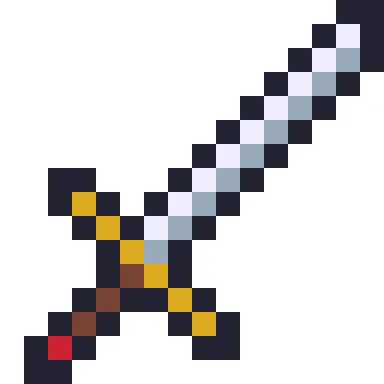
Diagonal weapons are a pixel-art staple because a 45-degree line is perfectly clean on a square grid. The blade runs from the top right to the middle of the tile, with a bright edge on one side and a cooler grey on the other, all inside a dark outline. A gold crossguard cuts across it, the grip is brown, and a single red pixel at the end of the pommel suggests a gem. The silhouette is clear even at its smallest size, which is why it works as an inventory icon.
How to use it
Export the sprite at 4× for a 64-pixel tile or 8× for a 128-pixel icon, always with nearest-neighbour scaling. Recolour the blade in the editor to make a family of weapons: gold for a legendary sword, rusty brown for a starting blade, icy blue for a frost sword. It also translates neatly into fuse beads or a small cross-stitch motif for a gamer. The sprite fills 71 of the 256 pixels and leaves the rest transparent, so it sits cleanly on any background colour in a game or on a web page.
Colour plan
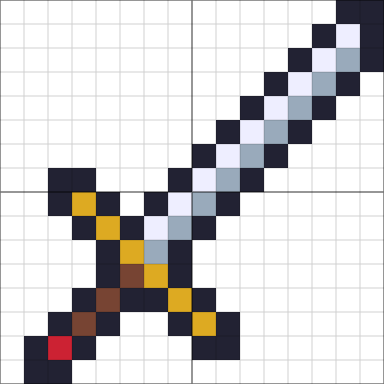
#222233 does the most work, 61% of the 71 pixels, followed by #EEEEFF at 13%. #EEEEFF (9), #99AABB (9), #DDAA22 (6), #774433 (3) and #CC2233 (1) are used only a little: small details worth marking on the chart so you don't miss them. 72% of the grid is left empty.
Working notes
It is 16 × 16 pixels; at 8× scale it becomes 128 × 128. The busiest row changes colour 9 times.
This is an original CraftPatterns design, licensed CC BY-NC 4.0: stitch it, share it and gift what you make — please credit craftpatterns.app and don't sell the pattern itself. Want to change it? Open it in the pixel art editor.
Last updated · About us