
| Size | 16 × 16 pixels |
|---|---|
| Colours | 7 · hex colours |
| Total pixels | 131 |
| Difficulty | Beginner (1/5) |
| Finished size | 16 × 16 px |
| Licence | CC BY-NC 4.0 — free for personal use with credit |
Materials
| Colour | Code | Name | Pixels | Share | Amount |
|---|---|---|---|---|---|
| #FFFFFF | 44 | 34% | 44 px | ||
| #332222 | 41 | 31% | 41 px | ||
| #CCCCDD | 16 | 12% | 16 px | ||
| #DD3344 | 13 | 10% | 13 px | ||
| #BBBBCC | 8 | 6% | 8 px | ||
| #774433 | 7 | 5% | 7 px | ||
| #DDAA77 | 2 | 2% | 2 px |
About this design
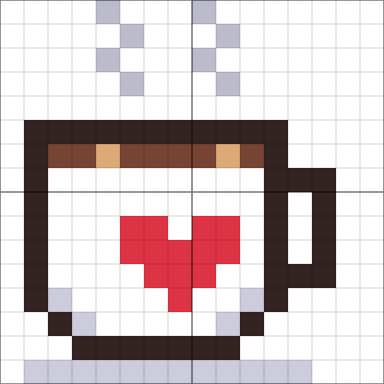
This little mug is built from a handful of shapes that read clearly even at small sizes: a dark outline, a white body with grey shading on the lower corners to round it off, a square handle on the right and a strip of coffee across the top with two flecks of crema. Two wavy lines of grey steam rise from the cup in a zigzag, which is the classic pixel-art shorthand for “hot”. The red heart on the side is five pixels wide and stands out against the white, and a pale grey saucer underneath anchors the whole sprite.
How to use it
Use the mug as a cosy icon for a blog, a stream overlay or a game’s café scene. Export at 8× for a 128-pixel image or at 16× for a crisp 256-pixel version; keep nearest-neighbour scaling so the steam stays sharp. To personalise it, change the heart to a star or an initial in the editor, or recolour the mug to match a favourite cup. The same grid makes a quick fuse bead coaster decoration or a tiny cross-stitch motif for a coffee lover’s card.
Colour plan
#FFFFFF does the most work, 34% of the 131 pixels, followed by #332222 at 31%. #BBBBCC (8), #774433 (7) and #DDAA77 (2) are used only a little: small details worth marking on the chart so you don't miss them. 49% of the grid is left empty.
Working notes
It is 16 × 16 pixels; at 8× scale it becomes 128 × 128. The busiest row changes colour 10 times.
This is an original CraftPatterns design, licensed CC BY-NC 4.0: stitch it, share it and gift what you make — please credit craftpatterns.app and don't sell the pattern itself. Want to change it? Open it in the pixel art editor.
Last updated · About us