| Size | 16 × 16 pixels |
|---|---|
| Colours | 6 · hex colours |
| Total pixels | 144 |
| Difficulty | Beginner (1/5) |
| Finished size | 16 × 16 px |
| Licence | CC BY-NC 4.0 — free for personal use with credit |
Materials
| Colour | Code | Name | Pixels | Share | Amount |
|---|---|---|---|---|---|
| #77DD55 | 72 | 50% | 72 px | ||
| #112211 | 42 | 29% | 42 px | ||
| #111111 | 24 | 17% | 24 px | ||
| #FFFFFF | 2 | 1% | 2 px | ||
| #FF88AA | 2 | 1% | 2 px | ||
| #55AA33 | 2 | 1% | 2 px |
About this design
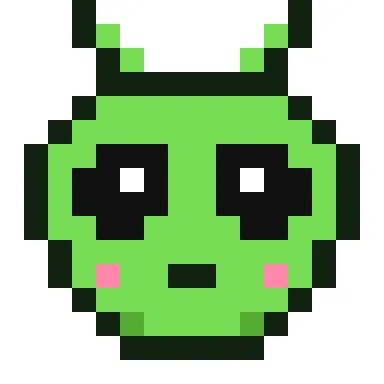
The head is a rounded green shape that is wider at the top, with two large black almond eyes that each have a white highlight. Two thin antennae rise from the top corners, and pink cheeks and a small mouth keep it friendly rather than creepy.
How to use it
Use it for a space birthday, a sci-fi club badge or a sticker. It makes a quick fuse bead magnet with only six colours. Pair it with the UFO for a scene, or change the green to purple in the editor.
Size and bead counts
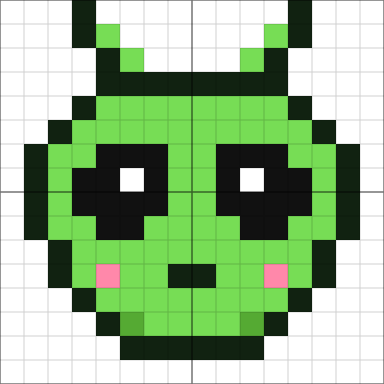
The picture fills 144 of the 256 squares in its grid, within an area 14 squares wide and 15 tall; the rest stay empty. It uses 6 colours: light green 72 (#77DD55), light black 42 (#112211), dark black 24 (#111111), white 2 (#FFFFFF), light pink 2 (#FF88AA), dark green 2 (#55AA33). Made with 5 mm fuse beads it measures about 7.0 × 7.5 cm and fits on one standard 29 × 29 pegboard. Stitched on 14-count Aida it is about 2.5 × 2.7 cm, or 3.2 × 3.5 cm on 11-count, so add a few centimetres of fabric on every side for the hoop.
Colour plan
#77DD55 does the most work, 50% of the 144 pixels, followed by #112211 at 29%. #FFFFFF (2), #FF88AA (2) and #55AA33 (2) are used only a little: small details worth marking on the chart so you don't miss them. 44% of the grid is left empty.
Working notes
It is 16 × 16 pixels; at 8× scale it becomes 128 × 128. The busiest row changes colour 12 times.
This is an original CraftPatterns design, licensed CC BY-NC 4.0: stitch it, share it and gift what you make — please credit craftpatterns.app and don't sell the pattern itself. Want to change it? Open it in the pixel art editor.
Last updated · About us