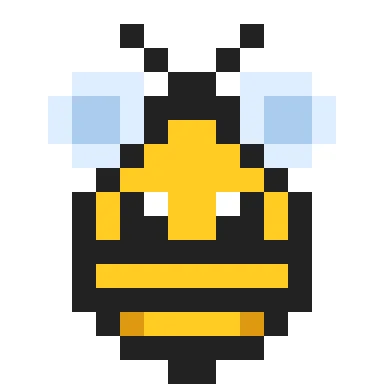
| Size | 16 × 16 pixels |
|---|---|
| Colours | 6 · hex colours |
| Total pixels | 120 |
| Difficulty | Easy (2/5) |
| Finished size | 16 × 16 px |
| Licence | CC BY-NC 4.0 — free for personal use with credit |
Materials
| Colour | Code | Name | Pixels | Share | Amount |
|---|---|---|---|---|---|
| #222222 | 58 | 48% | 58 px | ||
| #FFCC22 | 32 | 27% | 32 px | ||
| #DDEEFF | 18 | 15% | 18 px | ||
| #AACCEE | 8 | 7% | 8 px | ||
| #FFFFFF | 2 | 2% | 2 px | ||
| #DD9911 | 2 | 2% | 2 px |
About this design
The bee is drawn face-on: two antennae, a yellow head with white eyes, and a body of alternating black and yellow bands that narrow to a stinger. The wings are pale blue with a lighter centre, so they look translucent against the body.
How to use it
Use it for spring and garden themes, a “bee kind” card or a spelling-bee prize. In beads it makes a tiny keyring; stitched it suits a tea towel corner. Pair it with the tulip and sunflower patterns for a garden set.
Size and bead counts
The picture fills 120 of the 256 squares in its grid, within an area 12 squares wide and 15 tall; the rest stay empty. It uses 6 colours: dark grey 58 (#222222), light yellow 32 (#FFCC22), dark white 18 (#DDEEFF), light blue 8 (#AACCEE), light white 2 (#FFFFFF), dark yellow 2 (#DD9911). Made with 5 mm fuse beads it measures about 6.0 × 7.5 cm and fits on one standard 29 × 29 pegboard. Stitched on 14-count Aida it is about 2.2 × 2.7 cm, or 2.8 × 3.5 cm on 11-count, so add a few centimetres of fabric on every side for the hoop.
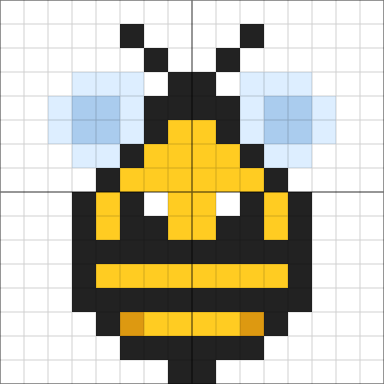
Colour plan
#222222 does the most work, 48% of the 120 pixels, followed by #FFCC22 at 27%. #AACCEE (8), #FFFFFF (2) and #DD9911 (2) are used only a little: small details worth marking on the chart so you don't miss them. 53% of the grid is left empty.
Working notes
It is 16 × 16 pixels; at 8× scale it becomes 128 × 128. The busiest row changes colour 10 times.
This is an original CraftPatterns design, licensed CC BY-NC 4.0: stitch it, share it and gift what you make — please credit craftpatterns.app and don't sell the pattern itself. Want to change it? Open it in the pixel art editor.
Last updated · About us