What counts as confetti
In stitching circles, confetti means single stitches of one colour that have no neighbour of the same colour. Picture a patch of sky where most stitches are mid-blue but one in every few is a slightly lighter or darker blue, dotted around at random. Each lone stitch needs its own start and finish, or a jump across the back, which slows you down and can make the back bulky.
CraftPatterns counts a stitch as isolated when none of the four stitches directly above, below, left or right of it share its colour. A stitch that only touches a matching colour diagonally still counts, because you cannot travel along a row or column to reach it. We also track specks: same-colour groups of eight stitches or fewer. A speck of two or three is less work than a lone stitch, but a chart full of them still feels like confetti to stitch.
The same idea applies to every craft on the site: in fuse beads it means constant bead-colour switches, in diamond painting lone drills, and in colourwork knitting short floats. The word comes from cross stitch, but the effect is universal.
Our test: one picture, thirteen charts
To show what really causes confetti and what cleanup changes, we built a test scene: a sky gradient with a sun, two grassy hills and a shaded red ball with a white highlight. It is generated from a fixed seed, so anyone can reproduce the numbers. We made two versions, one clean and one grainy (the same picture with heavier pixel noise, like a phone photo taken in dim light). Then we ran both through the cross stitch pattern generator at an 80-stitch width with up to 24 DMC colours, at every cleanup level, and once more with dithering.
- Clean scene, cleanup off
- 2.4%of stitches are isolated
- Grainy scene, cleanup off
- 5.6%same picture, more noise
- Grainy scene at Medium
- 0.0%stitchability 60 → 88
- Clean scene with dithering
- 17.8%stitchability 75 → 29
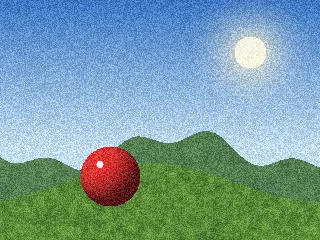 Grainy test scene 320 × 240 pixels
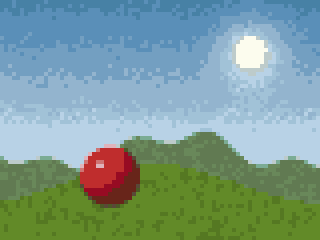 Cleanup Off5.6% isolated · run 3.6 · score 60
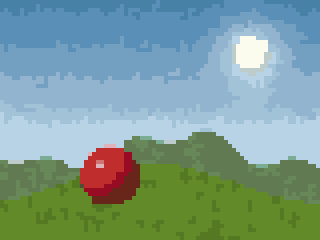 Cleanup Medium0.0% isolated · run 6.0 · score 88
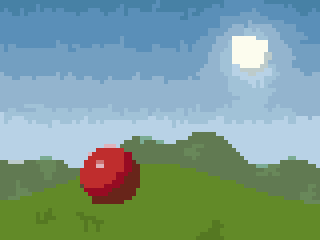 Cleanup Maximum0.0% isolated · run 8.2 · score 87
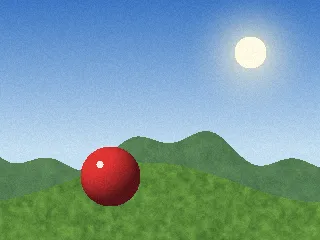 Clean test scene same picture, less noise
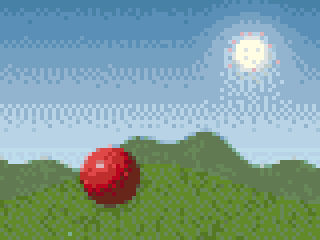 Clean scene + dithering17.8% isolated · score 29
Why photos produce confetti
A photograph contains thousands of slightly different colours. When it is reduced to, say, 24 thread colours, each area is assigned the nearest available thread. Areas that sit between two thread colours, such as gentle gradients, soft shadows and textures like grass, fur or skin, flip back and forth between the two options. The result is a speckled mix.
Our test shows how much each cause matters:
- Dithering. Diffusion dithering deliberately scatters colours to fake in-between shades. In the test it was the worst setting by far: 17.8% isolated stitches, 31.1% of stitches in specks, and an average run of only 2.2 stitches.
- Noisy or grainy photos. Random variation in the pixels turns straight into speckle. The grainy version of the same picture had 5.6% isolated stitches against 2.4% for the clean one, and its colour runs were a third shorter.
- Too many colours for the size. More colours means more borderline areas where two shades compete.
- A small design. Fine detail in the photo has nowhere to go except into individual stitches.
Pixel art and logos rarely produce confetti because they are already flat areas of colour. For those, the Preserve exact colours option keeps every original colour intact. For photos, our guide to choosing a photo covers the light, contrast and cropping that give calmer charts.
How confetti cleanup works
In the pattern generator, Confetti cleanup lives under Advanced. It finds small connected groups of one colour and merges each into the neighbouring colour it shares the longest border with. Groups of two or more only merge into a similar colour; a lone stitch is left alone only when every colour around it is very different. It runs up to three passes, so tidying one area can tidy the next.
Each level sets the largest group that can be merged:
| Level | Largest group merged | Good for |
|---|---|---|
| Off | none | Pixel art, logos, or when you want every detail |
| Light | 1 stitch (lone stitches only) | A gentle tidy-up that keeps texture |
| Medium | 2 stitches | Most photos; a good first try |
| Strong | 3 stitches | Busy backgrounds and soft gradients |
| Stronger | 5 stitches | Large smooth areas such as sky or skin |
| Maximum | 8 stitches | Bold, simplified, poster-like results |
What the levels did in our test
Stitches in small specks, by cleanup level
Share of stitches in same-colour groups of 8 or fewer
- Grainy scene
- Clean scene
Show the numbers
| Cleanup level | Grainy scene | Clean scene |
|---|---|---|
| Off | 12.5% | 8.3% |
| Light | 6.5% | 5.7% |
| Med | 4.5% | 4.3% |
| Strong | 2.7% | 3% |
| Str+ | 1.2% | 1.3% |
| Max | 0.6% | 0.5% |
Colour runs get longer at every level
Average stitches in a row before the colour changes
- Grainy scene
- Clean scene
Show the numbers
| Cleanup level | Grainy scene | Clean scene |
|---|---|---|
| Off | 3.6 | 5.6 |
| Light | 5.3 | 6.8 |
| Med | 6 | 7.6 |
| Strong | 6.7 | 8.3 |
| Str+ | 7.6 | 9.7 |
| Max | 8.2 | 10.5 |
Three things stand out:
- Light does most of the work on lone stitches. On the grainy scene it took isolated stitches from 5.6% to almost zero and lifted the score from 60 to 88.
- Higher levels work on specks, not singles. From Light to Maximum, the share of stitches in small specks on the grainy scene fell from 6.5% to 0.6%, and the average run grew from 5.3 to 8.2 stitches.
- No level fixes dithering’s damage as well as simply turning dithering off.
What it deliberately leaves alone
Two safeguards stop cleanup from flattening your design:
- Highlights are kept. If a small group differs from every surrounding colour by more than ΔE 25, it is treated as intentional, like the sparkle in an eye or a bright button on a coat. The white highlight on our test ball survived every level.
- Distant colours are not forced together. A group of two or more stitches only merges into a neighbour within ΔE 18. A small red patch next to blue stays red.
ΔE is the CIEDE2000 colour difference described on our methodology page, so “similar” means similar to the human eye, not just numerically close in red, green and blue.
The stitchability score
Every generated pattern shows a stitchability score from 0 to 100, with up to two short tips. It combines four things, weighted like this:
| Factor | Weight | Best when |
|---|---|---|
| Confetti | 35% | Few isolated stitches; 12% or more scores zero on this factor |
| Colour runs | 25% | Long runs of one colour along each row |
| Colours for the size | 25% | About 2 colours per 1,000 stitches or fewer |
| Rare colours | 15% | Few colours covering under 1% of the design |
The tips focus on the weakest factors. You might see “About 14% of stitches are isolated single cells. Raise confetti cleanup in Advanced to merge them”, or a suggestion to use Merge colours used fewer than N times for colours that barely appear.
One thing our test makes clear: the score’s confetti factor counts lone stitches only, so it levels off once Light has cleared them, even while higher levels keep lengthening runs. If the score stops moving but the chart still looks busy, judge by the preview and the average run, not the number alone.
A practical cleanup routine
Rather than jumping straight to Maximum, work in this order:
- Set the size first. A bigger design gives detail somewhere to live, and changing size after cleanup changes everything anyway.
- Check the colour count. If the tips mention too many colours, lower the slider a few steps. Our guide to choosing thread colours suggests ranges by size.
- Turn dithering off if it is on. In our test this did more than any cleanup level.
- Raise cleanup one level at a time and watch the preview. Use the Realistic view to judge how it will look stitched and the Chart view to see the confetti itself.
- Merge rare colours if the tips flag them.
- Touch up by hand. Open the result in the editor, where the pencil, fill and colour picker make it quick to fix a stray stitch or restore a detail that cleanup removed.
Judging the result
Zoom out, or step back from the screen, and compare before and after. If the subject is still clearly recognisable and textures still read as textures, the higher level is a win. If faces start to look flat or edges lose definition, step back down. Every photo has a balance point, and it is often lower for portraits than for landscapes.
The full results
| Scene and setting | Colours | Isolated | In specks of ≤ 8 | Average run | Stitchability |
|---|---|---|---|---|---|
| Grainy, off | 20 | 5.6% | 12.5% | 3.6 | 60 |
| Grainy, light | 19 | 0.0% | 6.5% | 5.3 | 88 |
| Grainy, medium | 19 | 0.0% | 4.5% | 6.0 | 88 |
| Grainy, strong | 19 | 0.0% | 2.7% | 6.7 | 88 |
| Grainy, stronger | 19 | 0.0% | 1.2% | 7.6 | 88 |
| Grainy, maximum | 19 | 0.0% | 0.6% | 8.2 | 87 |
| Clean, off | 23 | 2.4% | 8.3% | 5.6 | 75 |
| Clean, light | 23 | 0.1% | 5.7% | 6.8 | 84 |
| Clean, medium | 22 | 0.1% | 4.3% | 7.6 | 85 |
| Clean, strong | 22 | 0.1% | 3.0% | 8.3 | 85 |
| Clean, stronger | 21 | 0.1% | 1.3% | 9.7 | 86 |
| Clean, maximum | 21 | 0.1% | 0.5% | 10.5 | 84 |
| Clean, off + dithering | 23 | 17.8% | 31.1% | 2.2 | 29 |
Living with some confetti
If you love detailed realism, you may decide to keep plenty of confetti. Stitchers who do often use parking: working one area at a time, such as a 10 × 10 block, and leaving each threaded needle waiting at its next stitch instead of finishing a colour everywhere it appears. The alternative, cross-country stitching, finishes one colour across a nearby area before moving on. Most stitchers mix the two. Whichever you choose, the goal is a chart that matches how you like to stitch, and our stitch tracker can highlight one colour at a time to help with either.