A quick tour
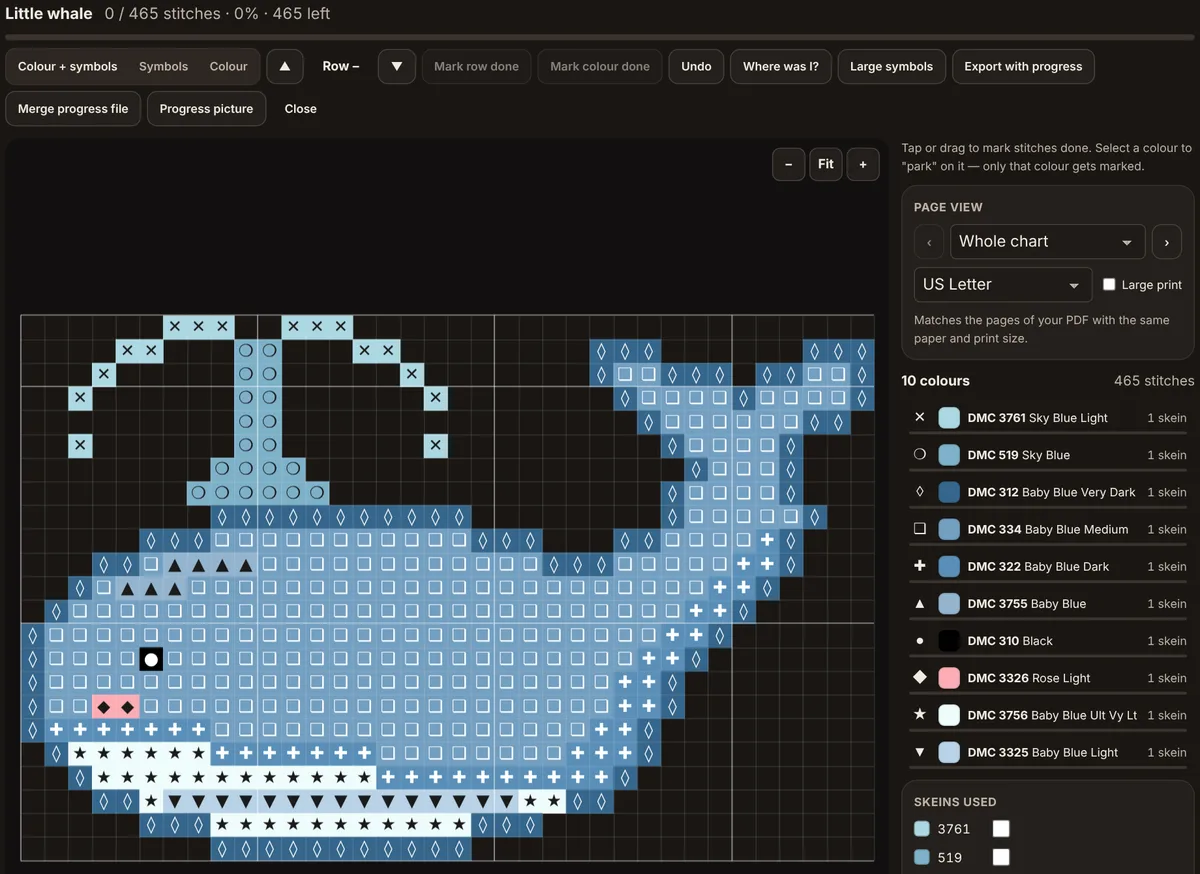
- Progress: stitches done, percentage and stitches left
- View: colour and symbols, symbols only, or colour only
- Rows: move up and down, then Mark row done
- Mark colour done and Undo
- Where was I? jumps to your last stitches
- Large symbols for low light or tired eyes
- Export with progress, Merge progress file, Progress picture
- The chart: tap or drag to mark stitches done
- Page view matching your printed PDF
- Colour key: select a colour to park on it
- Skeins used: tick each skein as you open it
Why track on a screen
Paper charts are reliable, but marking them with a highlighter is permanent and it is easy to lose your place on a big chart. The tracker keeps a live record of every stitch you have done, shows the percentage complete, and can jump straight back to where you stopped. It works for every craft on the site: stitches, beads, knots, blocks or drills.
Opening a pattern
Go to the stitch tracker and either choose Open a pattern file or pick a pattern from your saved projects. From a generator or the editor you can also press Open in tracker (on library pattern pages, Stitch it in the tracker), which loads the pattern directly. The tracker reads CraftPatterns .cpat files, PDFs made on the site (the editable pattern is embedded in them) and OXS files exported by other cross-stitch programs.
Marking stitches
- Tap or click a square to mark it done; tap again to unmark it.
- Drag across squares to mark a run in one movement.
- Mark row done fills the current row, which you choose with the up and down arrows. For C2C crochet the rows are the diagonals, numbered as in the PDF and outlined on the chart.
- From the keyboard, press Tab until the chart is outlined, move the blue cursor with the arrow keys and press Space to mark or unmark that stitch.
- Mark colour done finishes every remaining stitch of the selected colour.
- Undo reverses the last action.
The title bar shows how many stitches are done out of the total, and the key shows progress for each colour.
Parking on one colour
Select a colour in the key and the chart highlights only that colour. While a colour is selected, tapping marks only stitches of that colour, so you can sweep across a busy area without ticking the wrong squares. This mirrors the parking method many stitchers use with real thread. Select the colour again to release it.
Choosing the view
The chart can show colour and symbols, symbols only or colour only. Symbols are the most reliable way to tell similar colours apart, and colour is quicker to scan. Zoom in on a phone so each square is comfortably larger than your fingertip before marking.
Large symbols zooms in and draws heavier, bigger symbols, which helps in low light or if small print is hard to read. Page view shows one page of the chart at a time, split exactly like the PDF: choose the same paper size (US Letter or A4) and print size you printed with, and page 3 on screen is page 3 on paper, with the rest of the chart dimmed.
Planning your sessions
The tracker counts stitches left; your own pace turns that into time. Most stitchers manage 100 to 200 full stitches an hour. Here is what that means for the patterns in our library:
Time yourself for one relaxed hour on a typical area, then divide the stitches left by that number. Areas full of colour changes or confetti go slower than big blocks of one colour, so treat the estimate as a range.
Keeping your place
Where was I? jumps to the area where you last marked stitches. If you stitch from a printed chart and only use the tracker to record progress, mark a row or a block at the end of each session, so the jump lands in the right place next time.
For cross stitch, Skeins used lists each thread with one box per skein the pattern needs. Tick a box when you open a new skein, so you know what to buy before you run out; the ticks are saved with your progress.
Moving progress between devices
Progress is saved in the browser of the device you are using. To continue on another device, press Export with progress, which downloads a .cpat file containing the pattern and every marked stitch, and open that file on the other device. If the other device already has an older copy, Merge progress file adds the stitches marked in the file to the copy you have open, without removing any.
Sharing progress
Progress picture saves an image of the pattern with finished areas shown, ready to post or send. For stitching together with friends, see the guide to stitch-alongs.
Tips
- Export a progress file now and then as a backup, especially before clearing browser data.
- Use a stylus on a tablet for small squares.
- Print the chart as well if you prefer paper; the printing guide explains the options.